---
title: Packaging an Element with Maven
description: "Starting with Elements 3.4, we have updated the example project to include an advanced packaging scheme which automatically gathers dependencies and builds a zip file containing your [Element](https://namazustudios.com/glossary/element/) and it's dependencies. This greatly simplifies the process required to package an…"
url: "https://namazustudios.com/docs/custom-code/packaging-an-element-with-maven/"
updated: "2026-08-13"
category: "Your Game Code - Adding Custom Elements"
---
# Packaging an Element with Maven
Starting with Elements 3.4, we have updated the example project to include an advanced packaging scheme which automatically gathers dependencies and builds a zip file containing your [Element](https://namazustudios.com/glossary/element/) and it's dependencies. This greatly simplifies the process required to package an [Element](https://namazustudios.com/glossary/element/). The fundamentals of packaging an [Element](https://namazustudios.com/glossary/element/) described in [Deploying an Element](https://namazustudios.com/docs/custom-code/deploying-an-element/) have not changed. The structure of an [Element](https://namazustudios.com/glossary/element/) remains the same with the following directory structure:
- `libs` - a directory containing the jars of the [Element](https://namazustudios.com/glossary/element/)'s dependencies
- `classpath` - a directory containing the classpath of the [Element](https://namazustudios.com/glossary/element/) itself
- `attributes.properties` - a file added at deployment time which contains configuration
📝Notes on Structure
All of the above are optional provided there exists one, and only one, `package-info` annotated with the `@ElemmentDefinition` annotation (either in jar form or in classpath form)
## Manual Migration in Maven
It may be possible to merge the Example [Element](https://namazustudios.com/glossary/element/) to your current project and apply these changes. Before embarking on a rework of your code, see if a merge from our public repository completes without any conflicts.
### 1. Add Properties to The Build
Not strictly necessary, but every subsequent step assumes you complete this step. This makes it easy to edit the deployment configuration later.
```
${project.build.directory}/element
${element.target.dir}/${groupId}.${artifactId}
${element.target.dir}/${project.artifactId}-${project.version}.zip
```
### 2. Use `maven-antrun-plugin` to Ensure the [Element](https://namazustudios.com/glossary/element/)'s Code is Included
The [Maven Antrun Plugin](https://maven.apache.org/plugins/maven-antrun-plugin/) executes Ant tasks which can easily copy the build product into the [Element](https://namazustudios.com/glossary/element/) bundle.
```
org.apache.maven.plugins
maven-antrun-plugin
3.1.0
copy-element-build
process-classes
run
```
### 3. Use the `maven-resources-plugin` to Copy over Resoruces
The [Maven Resources Plugin](https://maven.apache.org/plugins/maven-resources-plugin/) ensures that everything in `src/main/resoruces` gets bundled in the [Element](https://namazustudios.com/glossary/element/).
```
maven-resources-plugin
3.3.1
copy-element-resources
process-resources
copy-resources
${element.distribution.dir}/classpath
src/main/resources
```
### 4. Use the `maven-dependency-plugin` To Copy Dependencies Over
The [Maven Dependency Plugin](https://maven.apache.org/plugins/maven-dependency-plugin/) copies all dependencies over to the final output.
📝Notes on Multi-Module Projects
Because the `maven-dependency-plugin` uses the local repository to find jars, it may be necessary to invoke a manual `mvn build install` during local development as the jars will only be copied from the local installed repository.
```
org.apache.maven.plugins
maven-dependency-plugin
3.6.0
copy-element-dependencies
process-classes
copy-dependencies
true
provided
ch.qos.logback,dev.getelements.elements.crossfire
sdk-local,sdk-local-maven,sdk-logback
${element.distribution.dir}/lib
```
📝Notes on Scope
Artifacts provided by Namazu Elements must be scoped as `provided` to avoid duplicate entries on the Classpath. All SDK modules should be provided scope. If you experience strange classpath errors, always double-check the provided dependencies.
## 5. (Optional) Add a Zip Bundle
To make distributing your [Element](https://namazustudios.com/glossary/element/) easier, you can add the following to generate zip of your [Element](https://namazustudios.com/glossary/element/) bundled with all of its dependencies. The [Maven Assembly Plugin](https://maven.apache.org/plugins/maven-assembly-plugin/) can do this.
#### 5.1 Generate `assembly.xml`
Create a file called `src/assembly/zip.xml` within the project and populate it with the assembly definition.
```
target-zip
zip
false
${element.distribution.dir}
/
```
#### 5.1 Add to `pom.xml`
Add the plugin referencing the assembly to the `pom.xml`
```
org.apache.maven.plugins
maven-assembly-plugin
3.6.0
zip-target-dir
package
single
false
false
${project.artifactId}-${project.version}
src/assembly/zip.xml
```
### 6. (Optional) Enable Crossfire via [Profile](https://namazustudios.com/glossary/profile/)
The existing Namazu Crossfire Guide covers how to enable Namazu Crossfire in the build. We include this section if you wish to use it with the build.
#### 6.1 Add Namazu Crossfire Dependencies
```
dev.getelements.elements.crossfire
server
${crossfire.version}
provided
dev.getelements.elements.crossfire
server
${crossfire.version}
element
provided
```
📝Notes on Scope
As Namazu Crossfire is added separately, we want it to be listed as provided.
#### 6.1 (Optional) Add to local `Element-lib`
This ensures that local development builds contain Namazu Crossfire. You do not need to perform this step if you do not wish to debug Namazu Crossfire locally in your IDE.
```
copy-crossfire-libs
generate-resources
copy-dependencies
provided
true
dev.getelements.elements.crossfire
server
element
${project.build.directory}/element-libs
```
📝Notes On Dependencies
This forces Crossfire to share the classpath with your [Element](https://namazustudios.com/glossary/element/), which is likely not the desired behavior. This should not have any consequences unless you share dependencies with Namazu Crossfire itself. We are aware this is a limitation will fix this with better isolation in future builds.
If you do not need to use Namazu Crossfire in your local IDE, then you can omit this step.
#### 6.2 (Optional) Instruct Maven to Fetch Namazu Crossfire [Element](https://namazustudios.com/glossary/element/) from Maven Central
Namazu Crossfire is available on Maven Central as a shaded jar. The shaded jar is qualified with the classifier `Element` indicating that it is an entirely self-contained instance of Crossfire. This code copies it to a directory for easy deployment.
```
org.apache.maven.plugins
maven-dependency-plugin
3.6.0
copy-crossfire-element
generate-resources
copy-dependencies
provided
true
dev.getelements.elements.crossfire
server
element
${element.target.dir}/dev.getelements.elements.crossfire.server/lib
```
### 7. Verify Deployment
Now that you have all of the sections added to your Maven `pom.xml` you can easily perform a build to ensure that Maven makes a neatly packaged release for you. The simple method to include this is to run Maven from the comand line:
```
mvn clean package
```
#### 7.1 Verify Bundle and Zip was Correctly Made
Within your IDE you shoudl see the following in the target directory. You can also verify this by simply inspecting the directory using your OS's file browser.
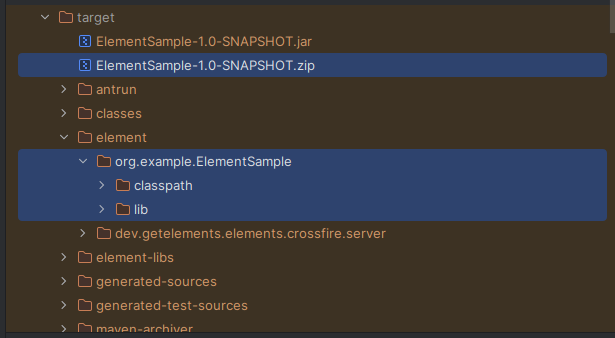
The [Element](https://namazustudios.com/glossary/element/) showing the Bundle and Contents
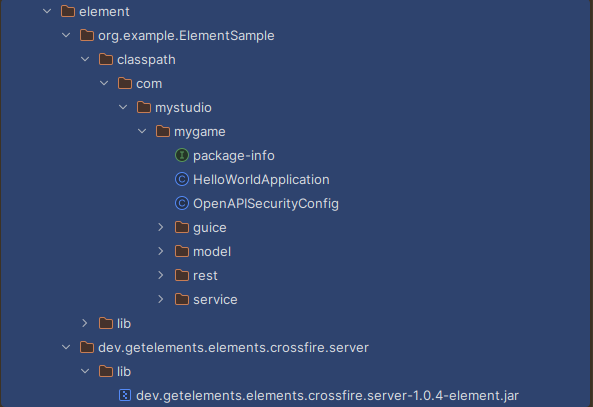
A more Expanded view of Above showing Crossfire
#### 7.2 Verify Zip File Created Properly
Use the zip tool to ensure that the [Element](https://namazustudios.com/glossary/element/) has everything in the right place.
```
unzip -l target/ElementSample-1.0-SNAPSHOT.zip
```
This should show something similar to the following output:
```
Archive: target/ElementSample-1.0-SNAPSHOT.zip
Length Date Time Name
--------- ---------- ----- ----
0 2025-11-04 14:26 lib/
0 2025-11-04 14:26 classpath/
0 2025-11-04 14:26 classpath/com/
0 2025-11-04 14:26 classpath/com/mystudio/
0 2025-11-04 14:26 classpath/com/mystudio/mygame/
0 2025-11-04 14:26 classpath/com/mystudio/mygame/rest/
0 2025-11-04 14:26 classpath/com/mystudio/mygame/service/
0 2025-11-04 14:26 classpath/com/mystudio/mygame/model/
0 2025-11-04 14:26 classpath/com/mystudio/mygame/guice/
16138 2025-10-26 19:28 lib/dev.getelements.elements.sdk-spi-guice-3.4.12.jar
10681 2021-10-16 11:56 lib/jakarta.inject.jakarta.inject-api-2.0.1.jar
2974216 2021-09-27 12:19 lib/com.google.guava.guava-31.0.1-jre.jar
794714 2023-12-24 08:32 lib/org.javassist.javassist-3.30.2-GA.jar
801785 2023-05-12 10:41 lib/com.google.inject.guice-7.0.0.jar
4617 2018-11-19 09:57 lib/com.google.guava.failureaccess-1.0.1.jar
334352 2023-08-27 01:26 lib/org.yaml.snakeyaml-2.2.jar
17364 2024-03-09 12:06 lib/com.fasterxml.jackson.jakarta.rs.jackson-jakarta-rs-json-provider-2.16.2.jar
54824 2025-10-26 19:28 lib/dev.getelements.elements.sdk-spi-3.4.12.jar
14835 2021-05-14 16:04 lib/com.google.errorprone.error_prone_annotations-2.7.1.jar
95629 2024-05-15 02:42 lib/io.swagger.core.v3.swagger-jaxrs2-jakarta-2.2.22.jar
16205 2025-10-26 19:28 lib/dev.getelements.elements.sdk-guice-3.4.12.jar
574448 2024-08-20 00:01 lib/io.github.classgraph.classgraph-4.8.175.jar
19936 2017-03-30 21:55 lib/com.google.code.findbugs.jsr305-3.0.2.jar
41513 2021-07-20 04:56 lib/org.slf4j.slf4j-api-1.7.32.jar
2199 2018-09-11 12:40 lib/com.google.guava.listenablefuture-9999.0-empty-to-avoid-conflict-with-guava.jar
8781 2017-01-18 15:09 lib/com.google.j2objc.j2objc-annotations-1.3.jar
4467 2005-08-01 02:23 lib/aopalliance.aopalliance-1.0.jar
208835 2021-04-01 11:48 lib/org.checkerframework.checker-qual-3.12.0.jar
32408 2024-03-09 11:09 lib/com.fasterxml.jackson.module.jackson-module-jakarta-xmlbind-annotations-2.16.2.jar
136369 2024-05-15 02:42 lib/io.swagger.core.v3.swagger-models-jakarta-2.2.22.jar
582784 2024-03-09 10:43 lib/com.fasterxml.jackson.core.jackson-core-2.16.2.jar
32475 2024-03-09 12:05 lib/com.fasterxml.jackson.jakarta.rs.jackson-jakarta-rs-base-2.16.2.jar
1414 2025-11-04 14:26 classpath/com/mystudio/mygame/OpenAPISecurityConfig.class
791 2025-11-04 14:26 classpath/com/mystudio/mygame/rest/HelloWorld.class
1766 2025-11-04 14:26 classpath/com/mystudio/mygame/rest/HelloWithAuthentication.class
2523 2025-11-04 14:26 classpath/com/mystudio/mygame/rest/ExampleContent.class
289 2025-11-04 14:26 classpath/com/mystudio/mygame/service/GreetingService.class
2138 2025-11-04 14:26 classpath/com/mystudio/mygame/service/GreetingServiceImpl.class
2110 2025-11-04 14:26 classpath/com/mystudio/mygame/HelloWorldApplication.class
1263 2025-11-04 14:26 classpath/com/mystudio/mygame/model/ExamplePostRequest.class
1825 2025-11-04 14:26 classpath/com/mystudio/mygame/model/ExamplePutResponse.class
1829 2025-11-04 14:26 classpath/com/mystudio/mygame/model/ExamplePostResponse.class
1259 2025-11-04 14:26 classpath/com/mystudio/mygame/model/ExamplePutRequest.class
612 2025-11-04 14:26 classpath/com/mystudio/mygame/package-info.class
846 2025-11-04 14:26 classpath/com/mystudio/mygame/guice/MyGameModule.class
--------- -------
6798240 45 files
```
📝What to Look For
- The only Namazu Elements' SDK entries are SPI related.
- Third party dependencies (eg [Guice](https://namazustudios.com/glossary/guice/)) are included automatically along with their dependencies.
- Test classes are excluded and only the production code appears in `classpath`
- The Jars are fully-qualified with group and artifact [id](https://namazustudios.com/glossary/id/)