Skip to content
  • Our Product
    • Namazu Elements
      • What is Elements?
      • Why open source?
      • Docs
        • Namazu Elements in Five Minutes or Less
        • RESTful APIs Library
        • Security Model
        • Accessing the Web UI (CMS)

    Our Product

    A logomark with three layered rhombuses adorning the lettermark that says Elements in bold all-caps sans-serif letters.
    • What is Namazu Elements? Discover our easy-to-use backend network solution built for online games. Rapidly enables full-scale multiplayer games or online solo adventures.
    • Why open source? Is there a truly open source server backend for connected games? There is now. Download and run a local copy of Namazu Elements and try it for yourself.
    Download Namazu Elements

    Get started

    • Quick start Read our Elements 5-minute quick start guide
    • Documentation Read our developer docs for learning more about Elements
    • RESTful APIs A full list of core API specs for working with the Elements framework
    • Security An overview of the server-authoritative security model of Elements
    • Accessing the CMS Manage your game with ease via the Namazu Elements CMS.

    Co-development Reimagined

    • Best real-time game backends in 2026 If you're researching an alternative to your current backend solution, we've prepared a report of all of the backend solutions on the market in 2026 and how Namazu Elements compares.
      Co-dev

    Recent Posts

    • The watercolor-styled Namazu Studios logo over a giant namazu lurking in the depth
      Namazu Studios Featured in San Diego Business Journal
      22 Sep 2025 Press
    • Namazu Elements 3.1 Released – Service Layer Fixes, Secure APIs, and Steam Bug Fix
      22 Apr 2025 Release Notes
  • Case Studies
  • About Us
  • News
  • Services
  • Book a call
namazu-studios-logo
Book a call

Getting Started

  • Namazu Elements in Five Minutes or Less
  • Accessing the Web UI (CMS)
  • CMS Feature Overview

Fundamentals

  • Why You Need a Server (and What “Authoritative” Means)
  • Elements as a Game Runtime
  • Where Your Authoritative Code Runs
  • Lifecycles and Flows

General Concepts

  • Overview
  • Custom Elements
  • Data Models
  • Security Model
  • N-Tier Architecture

Namazu Elements Core Features

  • User Authentication / Sign In
    • What is a User?
    • User Authentication in Elements
    • Auth Schemes
      • Auth Schemes
      • OAuth2
      • OIDC
  • Features
    • Applications
    • Sessions
    • Users and Profiles
    • Digital Goods
    • Progress and Missions
    • Progress and Missions (3.4+)
    • Leaderboards
    • Matchmaking – Comprehensive Guide
    • Followers
    • Friends
    • Receipts
    • Reward Issuances
    • Save Data
    • Metadata
    • Metadata (3.4+)
    • Queries
    • Web3
      • Wallets
      • Vaults
      • Omni Chain Support
      • Smart Contracts
        • Smart Contracts
  • Queries
    • Advanced Operators
    • Object Graph Navigation
    • Boolean Queries
    • Base Query Syntax
  • Advanced Operators
    • .name
    • .ref

Your Game Code - Adding Custom Elements

  • Custom Code Overview
  • Windows Setup
  • Mac OS Setup
  • Ubuntu Linux Setup
  • Element Anatomy: A Technical Deep Dive
  • Introduction to Guice and Jakarta in Elements
  • Structuring your Element
  • Events
  • Packaging an Element with Maven
  • Deploying an Element
  • Preparing for code generation
  • Properties
  • Websockets
  • RESTful APIs
  • Direct MongoDB Access (3.5+)

Configuration

  • Matchmaking – Comprehensive Guide
  • Direct Database Access and Batch Configuration
  • Batch Samples
    • Mission Upload Bash Script Sample
    • Item Upload Bash Script Sample

RESTful APIs

  • Importing into Postman
  • RESTful APIs Library
  • Swagger and Swagger UI

Add-Ons

  • Custom Elements
    • Crossplay
      • Namazu Crossfire (Multiplayer)
      • Deploying Namazu Crossfire in your game
  • Game Engines
    • Unity
      • Elements Codegen
      • Crossfire
    • Roblox
      • Roblox Overview
      • Secure Player Authentication & Registration
      • Global Matchmaking
      • Roblox Security Best Practices

Troubleshooting

  • Common Issues with Docker
  • Local SDK
    • Unable to deploy application : dev.getelements.elements.sdk.exception.SdkElementNotFoundException
    • Could not load class : java.lang.NoClassDefFoundError
  • Namazu Elements Community Edition
    • Common Issues with Docker
    • Unable to deploy application : dev.getelements.elements.sdk.exception.SdkElementNotFoundException
    • Running in the IDE
      • Exception in monitor thread while connecting to server localhost:27017
      • Could not deployAvailableApplications Jetty server Failed to bind to /0.0.0.0:8080 Address already in use

Releases

  • 3.6 Release Notes
  • 3.5 Release Notes
  • 3.4 Release Notes
  • 3.3 Release Notes
  • 3.2 Release Notes
  • 3.1 Release Notes
View Categories
  • Home
  • Docs
  • Releases
  • 3.4 Release Notes

3.4 Release Notes

Est. read time: 3 min read

Namazu Elements 3.4 Release Notes #

Overview #

Namazu Elements 3.4 is one of our most substantial updates yet, introducing deep improvements across the backend, UI, and developer ecosystem.
This release enhances matchmaking performance, modernizes the CMS interface, adds robust file management, and introduces full support for real-time multiplayer through Namazu Crossfire.


MultiMatch Internal API #

We’ve greatly improved the MultiMatch internal API, providing:

  • Optimized matchmaking performance for low-latency, high-concurrency scenarios.
  • Improved query efficiency and reduced memory overhead.
  • Simplified internal structures for easier integration and debugging.

These upgrades form the foundation for the new multiplayer capabilities and improve reliability at scale.


Completely Rebuilt CMS UI #

The Elements CMS has been rebuilt from the ground up, with a modern design and several major new features:

  • JSON Object Editing: Directly view and edit raw JSON for every object type.
  • Light Mode / Dark Mode: Switch themes for a better visual experience.
  • System Readout Dashboard: View all Elements in your system with links to documentation.
  • Health Checks: Run live system diagnostics from within the CMS UI.
  • Feature Flags: Toggle features dynamically, without redeployments.
  • Improved Diagnostics & Troubleshooting: More transparent error surfacing and runtime logs.

This overhaul makes Elements significantly easier to manage, observe, and customize.


Large Object API Integration #

You can now access and manage files directly through the Large Object API within the CMS.
Developers can upload, modify, and remove large files seamlessly, consolidating asset management within the same interface used for Element and metadata management.


Expanded Search Capabilities #

We’ve added search query support for previously missing collections, ensuring that all data types are now discoverable and queryable through the CMS and APIs.


Metadata Validation Fixes #

Fixed several issues with metadata validation, improving consistency and reducing false validation errors during object creation and update workflows.


Real-time Multiplayer with Namazu Crossfire #

Elements 3.4 adds official support for WebRTC and WebSocket-based multiplayer via Namazu Crossfire.

This new Element enables fast, low-latency real-time gameplay powered by the updated MultiMatch and data infrastructure.

Many of the backend and database changes in this release were designed specifically to support Crossfire’s real-time architecture, including improved connection handling, session management, and matchmaking throughput.


Updated Example: Pong #

The Pong example on GitHub has been fully updated to include:

  • A working demonstration of the new matchmaking system.
  • Real-time networked play powered by Crossfire’s WebRTC transport.
  • Integration examples showing how to use Elements APIs for session setup, matchmaking, and gameplay synchronization.

You can find the updated example in the Namazu Studios GitHub repository


Updated Documentation #

All documentation has been refreshed for 3.4, including:

  • Full API references for the MultiMatch and Large Object APIs.
  • Guides for integrating and deploying Namazu Crossfire.
  • CMS UI walkthroughs and troubleshooting improvements.

Summary #

Namazu Elements 3.4 brings together performance, usability, and multiplayer innovation.
With this release, developers gain:

  • A faster, smarter matchmaking system.
  • A modern, rebuilt CMS UI.
  • Integrated file management via the Large Object API.
  • Full real-time multiplayer support through Namazu Crossfire.
  • A refreshed Pong demo showcasing everything in action.

Screenshots #
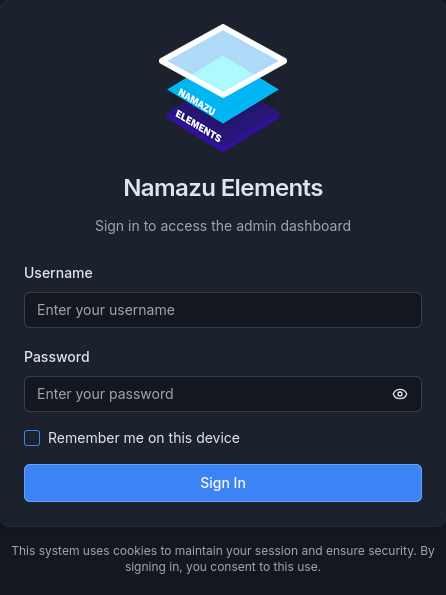
New Login Screen
Main Dashboard for Namazu Elements CMS
Complete Diagnostics for Custom Code
Native API Explorer for Custom APIs

What are your Feelings
Still stuck? How can we help?

How can we help?

Updated on January 29, 2026
3.5 Release Notes3.3 Release Notes
Table of Contents
  • Namazu Elements 3.4 Release Notes
    • Overview
    • MultiMatch Internal API
    • Completely Rebuilt CMS UI
    • Large Object API Integration
    • Expanded Search Capabilities
    • Metadata Validation Fixes
    • Real-time Multiplayer with Namazu Crossfire
    • Updated Example: Pong
    • Updated Documentation
    • Summary
    • Screenshots
  • Documentation
  • Terms of Service
  • Privacy Policy
  • Contact us
  • Linkedin
  • Join our Discord

Namazu Studios LLC is powered by Namazu Elements, an open source modular backend framework for connected games.

Namazu Elements
  • Download
  • About Elements
  • Open source
  • Documentation
  • Support
Namazu Studios
  • Case Studies
  • About Us
  • News
Best realtime game backends 2026
Get in Touch
  • info@namazustudios.com
  • Book a call
  • (619) 862-2890
  • Linkedin
  • Discord

©2008-2026 Namazu Studios. All Rights Reserved.