

 Doc Summary

When running in the IDE, if you get an error during startup that looks like this:
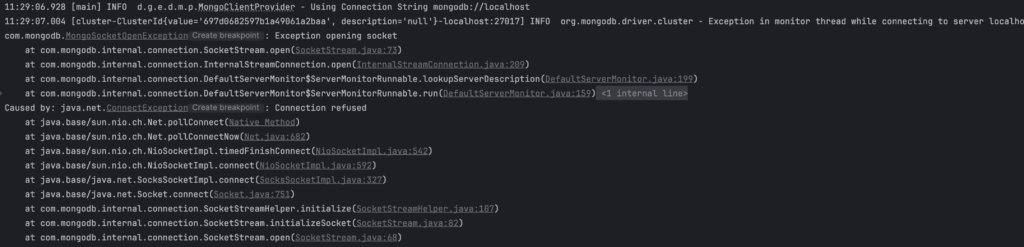
[main] INFO  d.g.e.d.m.p.MongoClientProvider - Using Connection String mongodb://localhost
[cluster-ClusterId{value='697d0682597b1a49061a2baa', description='null'}-localhost:27017] INFO  org.mongodb.driver.cluster - Exception in monitor thread while connecting to server localhost:27017
com.mongodb.MongoSocketOpenException: Exception opening socket
...
Caused by: java.net.ConnectException: Connection refused
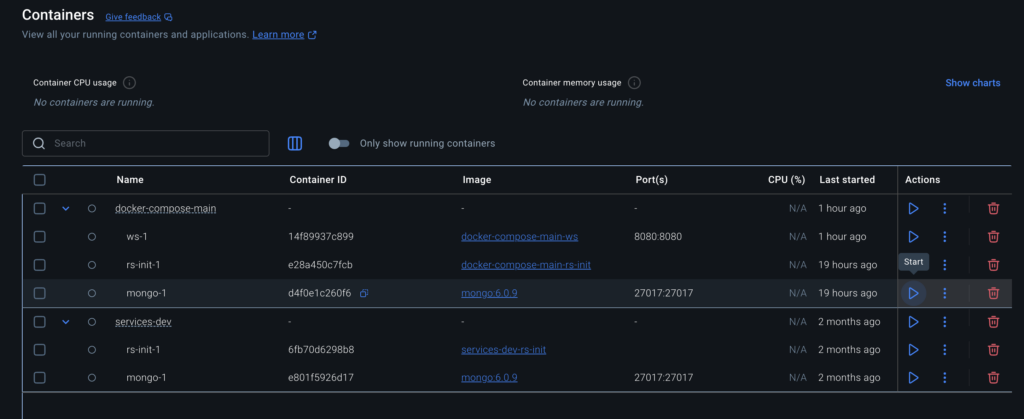
then you likely don’t have a mongodb container running. Mongo is the database that Elements uses, and Elements attempts to make a connection to a local instance running at the default mongo port (27017).
If you’ve already run mongo before using the Docker compose up command that you previously used, or via Docker Desktop.
Warning
If you have multiple instances of mongo, make sure that you run the same one each time for data consistency.
There are a few ways to get mongo running if you haven’t already. Since you’re running in the IDE, it’s probably safe to assume that you have either the Elements source project or the example element project (or some other custom Element project). Included in these is a services-dev folder (source / example) with a Docker compose file that will fetch and run mongo for you.