Skip to content
  • Our Product
    • Namazu Elements
      • What is Elements?
      • Why open source?
      • Docs
        • Namazu Elements in Five Minutes or Less
        • RESTful APIs Library
        • Security Model
        • Accessing the Web UI (CMS)

    Our Product

    A logomark with three layered rhombuses adorning the lettermark that says Elements in bold all-caps sans-serif letters.
    • What is Namazu Elements? Discover our easy-to-use backend network solution built for online games. Rapidly enables full-scale multiplayer games or online solo adventures.
    • Why open source? Is there a truly open source server backend for connected games? There is now. Download and run a local copy of Namazu Elements and try it for yourself.
    Download Namazu Elements

    Get started

    • Quick start Read our Elements 5-minute quick start guide
    • Documentation Read our developer docs for learning more about Elements
    • RESTful APIs A full list of core API specs for working with the Elements framework
    • Security An overview of the server-authoritative security model of Elements
    • Accessing the CMS Manage your game with ease via the Namazu Elements CMS.

    Co-development Reimagined

    • Best real-time game backends in 2026 If you're researching an alternative to your current backend solution, we've prepared a report of all of the backend solutions on the market in 2026 and how Namazu Elements compares.
      Co-dev

    Recent Posts

    • The watercolor-styled Namazu Studios logo over a giant namazu lurking in the depth
      Namazu Studios Featured in San Diego Business Journal
      22 Sep 2025 Press
    • Namazu Elements 3.1 Released – Service Layer Fixes, Secure APIs, and Steam Bug Fix
      22 Apr 2025 Release Notes
  • Case Studies
  • About Us
  • News
  • Services
  • Book a call
namazu-studios-logo
Book a call
Popular Search Roblox

Getting Started

  • Namazu Elements in Five Minutes or Less
  • Overview
  • Accessing the Web UI (CMS)
  • CMS Feature Overview

Fundamentals

  • Why You Need a Server (and What “Authoritative” Means)
  • Elements as a Game Runtime
  • Where Your Authoritative Code Runs
  • Lifecycles and Flows

General Concepts

  • Custom Elements
  • Data Models
  • Security Model
  • N-Tier Architecture

Namazu Elements Core Features

  • Email Service
  • Applications
  • Sessions
  • Users and Profiles
  • Digital Goods
  • Progress and Missions
  • Progress and Missions (3.4+)
  • Leaderboards
  • Matchmaking – Comprehensive Guide
  • Friends
  • Followers
  • Product Bundles and SKUs
  • Item Ledger
  • Receipts
  • Reward Issuances
  • Save Data
  • Metadata
  • Metadata (3.4+)
  • Queries
  • User Authentication / Sign In
    • What is a User?
    • Email Verification
    • User Authentication in Elements
    • Account Linking
    • Setting Up Twitch OIDC Login (Backend)
    • OIDC Login for Thick Clients (Browser Redirect Flow)
    • Auth Schemes
      • Auth Schemes
      • OAuth2
      • OIDC
  • Features
    • Web3
      • Wallets
      • Vaults
      • Omni Chain Support
      • Smart Contracts
        • Smart Contracts
  • Queries
    • Advanced Operators
    • Object Graph Navigation
    • Boolean Queries
    • Base Query Syntax
  • Advanced Operators
    • .name
    • .ref

Your Game Code - Adding Custom Elements

  • Custom Code Overview
  • Windows Setup
  • Mac OS Setup
  • Ubuntu Linux Setup
  • Element Anatomy: A Technical Deep Dive
  • Introduction to Guice and Jakarta in Elements
  • Structuring your Element
  • Events
  • Packaging an Element with Maven
  • Deploying an Element
  • Preparing for code generation
  • Properties
  • Websockets
  • RESTful APIs
  • Direct MongoDB Access (3.5+)
  • Building the Example Element: A Complete Walkthrough
  • Building the Kotlin Example Element: A Complete Walkthrough

Configuration

  • Configuring External URLs for Deployment
  • Matchmaking – Comprehensive Guide
  • Direct Database Access and Batch Configuration
  • Connecting Namazu Elements to a TLS-Enabled MongoDB Replica Set
  • Batch Samples
    • Mission Upload Bash Script Sample
    • Item Upload Bash Script Sample

RESTful APIs

  • Importing into Postman
  • RESTful APIs Library
  • Swagger and Swagger UI

Add-Ons

  • Crossplay
    • Crossfire Client Libraries (JVM & Browser)
    • Crossfire Protocol Reference
    • Crossfire: Custom Matchmaking Algorithms
    • Namazu Crossfire (Multiplayer)
    • Deploying Namazu Crossfire in your game
  • Roblox
    • Roblox Overview
    • Secure Player Authentication & Registration
    • Global Matchmaking
    • Roblox Security Best Practices
  • Container on Demand
    • Namazu Conductor
    • Namazu Conductor Admin API
    • Configuring Namazu Conductor Providers
  • Commerce
    • Stripe
      • Stripe
      • Configuring the Stripe Element
      • Stripe REST API Reference
      • Stripe REST API Reference

Game Engine & Client Support

  • Unity
    • Elements Unity Plugin
    • Unity Crossfire Plugin
  • Gamemaker
    • Incorporating GMEXT-Elements into a GameMaker Project

Troubleshooting

  • Common Issues with Docker
  • Local SDK
    • Unable to deploy application : dev.getelements.elements.sdk.exception.SdkElementNotFoundException
    • Could not load class : java.lang.NoClassDefFoundError
  • Namazu Elements Community Edition
    • Common Issues with Docker
    • Unable to deploy application : dev.getelements.elements.sdk.exception.SdkElementNotFoundException
    • Running in the IDE
      • Exception in monitor thread while connecting to server localhost:27017
      • Could not deployAvailableApplications Jetty server Failed to bind to /0.0.0.0:8080 Address already in use

Releases

  • 3.8 Release Notes
  • 3.7 Release Notes
  • 3.6 Release Notes
  • 3.5 Release Notes
  • 3.4 Release Notes
  • 3.3 Release Notes
  • 3.2 Release Notes
  • 3.1 Release Notes
View Categories
  • Home
  • Docs
  • Namazu Elements Core Features
  • User Authentication / Sign In
  • What is a User?

What is a User?

Est. read time: 1 min read

AI Doc Summarizer Doc Summary
AI Doc Summarizer Thinking Thinking

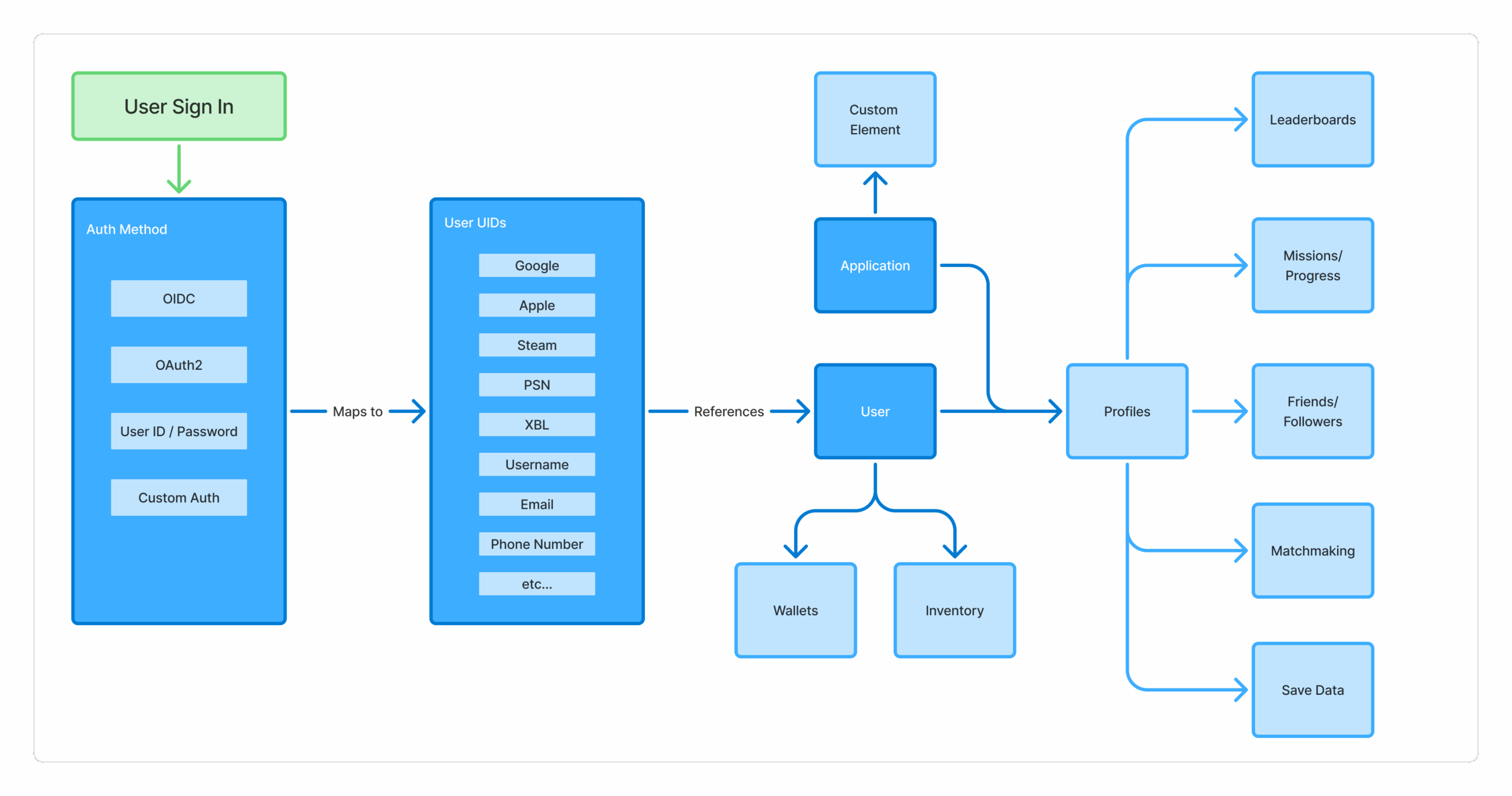
The User object is the primary representation of a person’s account in Elements. The User is what helps connect Profiles, Inventory, Progress, and other collections inside of Elements.

User UID #

Each authentication method maps to a User UID internally, which in turn keeps a reference to the User. There can be any number of these User UIDs, but each scheme can only exist once per User. In other words, there can be any number of different ways to access the User, but that User can only have a single Google id, Apple id, Steam id, etc.
Profiles #

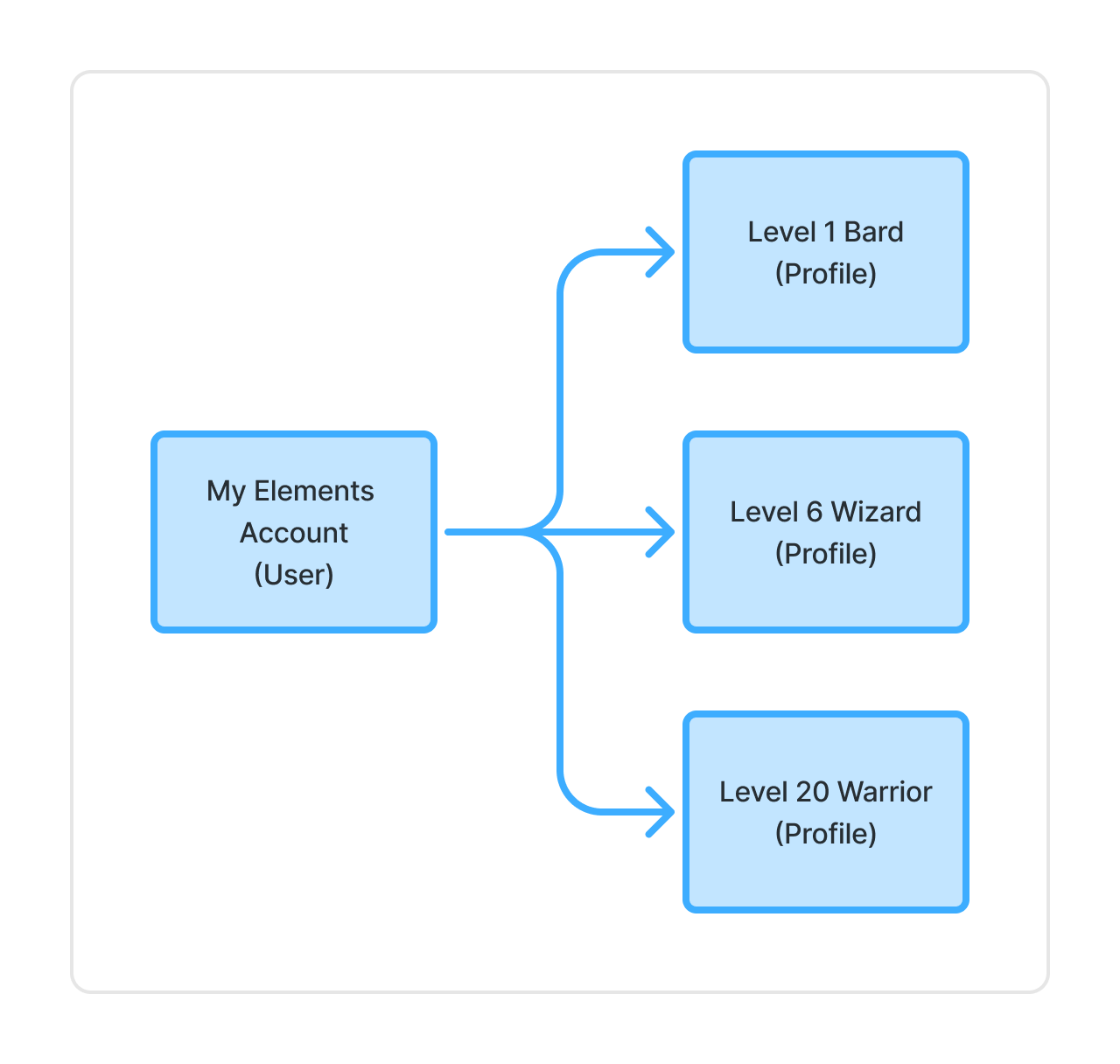
Many of the core features are associated directly with a Profile. Elements uses a one-to-many model for the User / Profile relationship. A Profile is linked directly to both one single Application and one single User.

One example might be a game where you might have your account login (User) and several characters that you can create with individual character attributes and story progress (Profile).
As Elements is a multi-Tenant system, there can be many Applications that allow for many Profiles per Application.

Some collections, such as Inventory, are associated directly with the User object, and can be accessed across multiple Profiles. However, other collections reference the individual Profile directly.

So how do I make a User…? #

Ah right! There are a few different ways to make a User, but without diving into a custom Element, here are the three simplest.

First, we can use the admin console as a SUPERUSER to create new users (see Users and Profiles).

Second, we can use the SignUp API from our frontend code for basic User id / password auth. Every field on the signup request is optional — name, email, and password can all be omitted, in which case Elements generates them for you (a random name, an <name>@anonymous.invalid placeholder email, and a random password). Because a generated password can’t be seen anywhere else, it’s returned once in the signup response. You can also pass a profiles array on the same request to create one or more Profiles for the new User in the same call, rather than creating them separately afterward.

(Elements 3.9+) Instead of (or in addition to) an explicit profiles entry, you can pass autoCreateProfileApplicationNameOrId (an Application name or id) on the User-create/signup request to have Elements automatically create the User’s primary Profile for that Application — but only if the Application is configured for it (see autoCreateProfile and maxProfiles in Applications); otherwise the field is a no-op. Naming the same Application in both autoCreateProfileApplicationNameOrId and profiles is a 400 Bad Request, since the two mechanisms conflict for that Application.

Lastly, we can use any OIDC, OAuth2, or Custom Auth to sign in, which will automatically create a User with the info in the token if one doesn’t exist yet.

Check out here for more info on User creation and authentication

What are your Feelings
Still stuck? How can we help?

How can we help?

Updated on August 15, 2026
OIDC Login for Thick Clients (Browser Redirect Flow)Email Verification
Table of Contents
  • User UID
  • Profiles
  • So how do I make a user…?
  • Documentation
  • Terms of Service
  • Privacy Policy
  • Contact us
  • Linkedin
  • Join our Discord

Namazu Studios LLC is powered by Namazu Elements, an open source modular backend framework for connected games.

Namazu Elements
  • Download
  • About Elements
  • Open source
  • Documentation
  • Support
Namazu Studios
  • Case Studies
  • About Us
  • News
Best realtime game backends 2026
Get in Touch
  • info@namazustudios.com
  • Book a call
  • (619) 862-2890
  • Linkedin
  • Discord

©2008-2026 Namazu Studios. All Rights Reserved.