

 Doc Summary

This page documents the wire protocol used by Namazu Crossfire: the connection state machine, the JSON message envelope, the four handshake flows, the signaling model (direct vs. broadcast signals, backlog/replay, and signal lifecycles), control messages, error handling, and the ping/pong keepalive. It is intended for anyone implementing a Crossfire client from scratch, or extending the server with a custom matchmaking algorithm.
If you are integrating an existing client (Unity, JVM, or browser), see Crossfire Client Libraries instead — this page is for protocol implementers.
Connection lifecycle #
Every WebSocket connection to the Crossfire endpoint progresses through a single, one-way state machine:
WAITING → READY → HANDSHAKE → SIGNALING → TERMINATED
- WAITING — the socket has not yet been accepted by the server.
- READY — the connection is open. The client must send a handshake message (
FIND,JOIN,CREATE, orJOIN_CODE) as its first message. Any signaling or direct-signaling messages sent this early are buffered rather than rejected, and are replayed once the connection reachesSIGNALING. - HANDSHAKE — entered as soon as a handshake message is accepted. A second handshake attempt is not allowed; the connection may only enter this phase once. Signaling messages received while still in this phase are also buffered.
- SIGNALING — entered once authentication succeeds and a match has been assigned. From here the client exchanges signals and control messages until the socket closes.
- TERMINATED — absorbing. Once terminated, further inbound messages are logged and dropped rather than causing further errors.
Any message whose category is not valid for the current phase closes the connection with a policy-violation close code and a ProtocolStateException.
Message envelope and wire format #
Every message is a single JSON object with a type discriminator field. The server resolves type against ProtocolMessageType and deserializes the REST of the object into the matching Java class. There is no separate envelope wrapper — the payload fields sit alongside type at the top level. Unknown fields are ignored (the shared Jackson mapper has FAIL_ON_UNKNOWN_PROPERTIES disabled), which keeps the wire format forwards-compatible across minor versions.
{
  "type": "STRING_BROADCAST",
  "profileId": "abc123",
  "lifecycle": "SESSION",
  "payload": "hello"
}
Binary payloads (BINARY_BROADCAST, BINARY_RELAY) are base64-encoded strings on the wire, per standard Jackson byte[] handling.
Each ProtocolMessageType belongs to exactly one category (ProtocolMessageCategory), and the connection phase determines which categories are legal to receive:
| Category | Used for | Valid phase |
|---|---|---|
HANDSHAKE | FIND, JOIN, CREATE, JOIN_CODE, CREATED, MATCHED | READY |
SIGNALING | Broadcast signals delivered to every other participant | SIGNALING |
SIGNALING_DIRECT | Signals addressed to one specific recipient (SDP/ICE exchange, relays) | SIGNALING |
CONTROL | OPEN, CLOSE, END, LEAVE | SIGNALING |
ERROR | ERROR (server → client only) | any phase |
Some message types are server-only (ProtocolMessage.isServerOnly() returns true) — for example MATCHED and all server-driven presence signals (CONNECT, DISCONNECT, HOST, SIGNAL_JOIN, SIGNAL_LEAVE). If a client sends one of these, the server rejects it with an INVALID_MESSAGE error and closes the connection.
Protocol versions #
Crossfire currently defines two protocol versions, negotiated per-connection by the version field of the handshake request:
V_1_0— the original handshake flows:FIND(matchmaking queue) andJOIN(join/resume by match id). All signaling, control, and error message types are alsoV_1_0.V_1_1— adds the create/join-code flow:CREATEandJOIN_CODE, plus theCREATEDresponse.
A version is compatible with a request if the major versions match and the server/Session version’s minor is greater than or equal to the requested minor (Version.isCompatibleWithRequestedVersion). The server routes each handshake request to a dedicated handler based on the version: V10HandshakeHandler only understands FIND/JOIN, while V11HandshakeHandler only understands CREATE/JOIN_CODE. Both extend the shared V1HandshakeHandler base, which manages authentication and the handshake-internal state machine (READY → AUTHENTICATING → AUTHENTICATED → MATCHING → TERMINATED) common to all four flows.
The four handshake flows #
Every flow follows the same shape: client sends a handshake request → server authenticates the Session/Profile → server resolves a MatchmakingAlgorithm (default, or named via the Application’s MatchmakingApplicationConfiguration.matchmaker) → the algorithm asynchronously matches or creates → server sends a handshake response → connection transitions to SIGNALING.

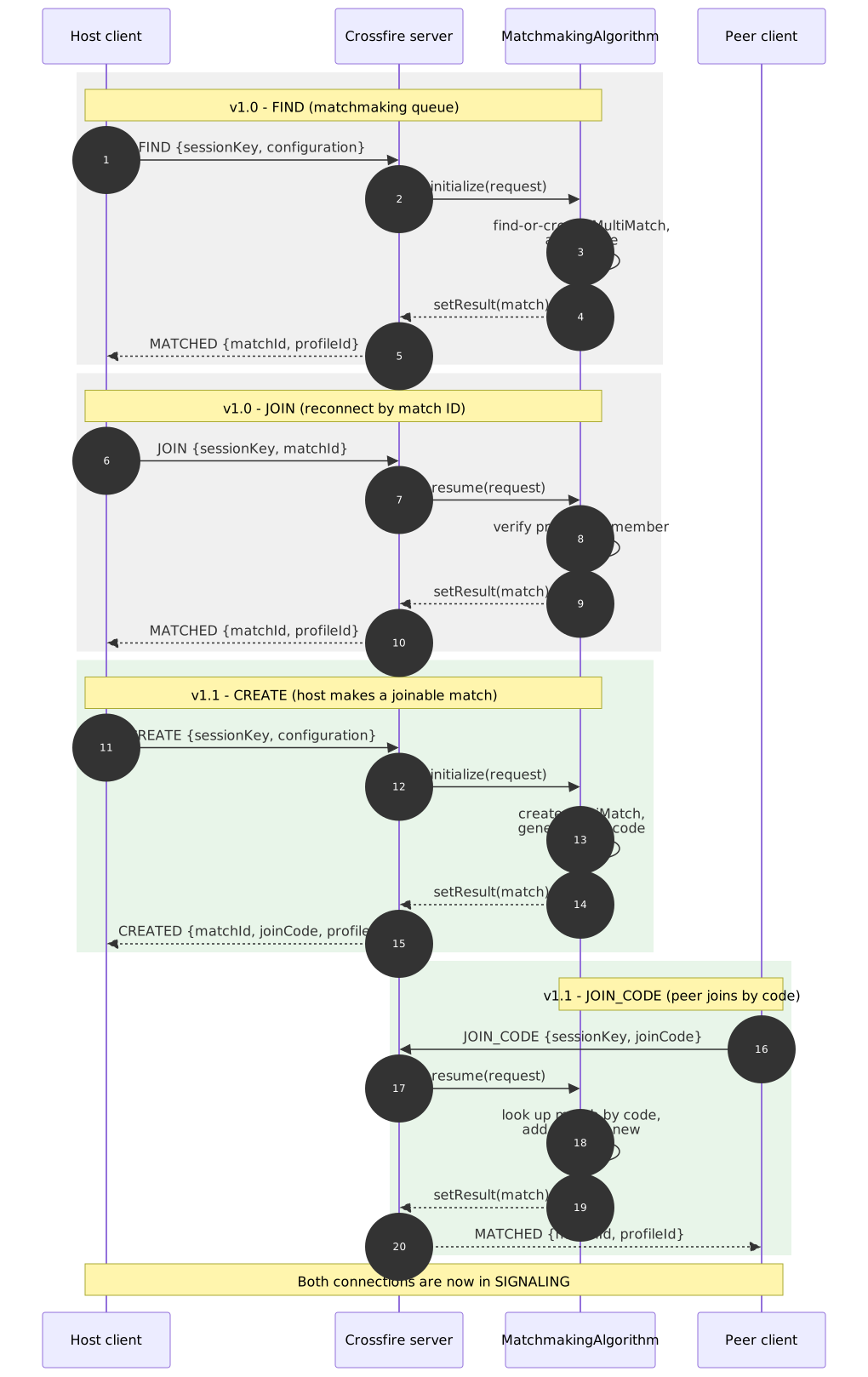
FIND (v1.0) — join the matchmaking queue #
Request (FindHandshakeRequest): type: "FIND", version, sessionKey (required), profileId (optional — falls back to the Profile attached to the Session), configuration (required — the name of the MatchmakingApplicationConfiguration to use).
The server resolves the named FindMatchmakingAlgorithm and calls initialize(request), which is expected to find-or-create a MultiMatch and add the Profile to it. Response: MatchedResponse (type: "MATCHED", matchId, profileId).
JOIN (v1.0) — rejoin a known match #
Request (JoinHandshakeRequest): type: "JOIN", version, sessionKey, matchId (required), profileId (optional). Used to reconnect after a disconnection or network interruption — the client already knows its match id.
The server looks up the match’s own MatchmakingApplicationConfiguration (so the join uses the same algorithm the match was created under), then calls the algorithm’s resume(request), which verifies the requesting Profile is actually a member of the match before returning a handle. Response: MatchedResponse.
CREATE (v1.1) — create a joinable match #
Request (CreateHandshakeRequest): type: "CREATE", version (defaults to V_1_1), sessionKey, profileId, configuration (required).
Resolves a JoinCodeMatchmakingAlgorithm and calls initialize(request), which creates the match and generates a join code. Response: CreatedHandshakeResponse (type: "CREATED", matchId, joinCode, profileId) — the join code is the piece of data a game would show the host to share with other players.
JOIN_CODE (v1.1) — join by code #
Request (JoinCodeHandshakeRequest): type: "JOIN_CODE", version, sessionKey, joinCode (required), profileId.
The server looks the match up by join code, resolves the same JoinCodeMatchmakingAlgorithm the match was created with, and calls resume(request), which adds the joining Profile to the match if it isn’t already a member. Response: MatchedResponse (not CreatedHandshakeResponse — only the creator receives the join code back; subsequent joiners already know it).
All four flows are pluggable — see Custom Matchmaking Algorithms for how to replace the default FIFO/join-code implementations with your own matching, rating, or lobby logic.
Signaling phase #
Once a connection enters SIGNALING, the server sends the handshake response and then joins the connection to the match’s in-memory mailbox. From this point, three kinds of traffic flow over the socket: broadcast signals, direct signals, and control messages.
Broadcast vs. direct signals #
A broadcast signal (BroadcastSignal) is delivered to every other participant in the match except the sender. Client-originated broadcast types are STRING_BROADCAST and BINARY_BROADCAST (arbitrary game data). Server-originated (“server-only”) broadcast types report match presence: CONNECT, DISCONNECT, HOST, SIGNAL_JOIN, SIGNAL_LEAVE.
A direct signal (DirectSignal) is addressed to exactly one recipient Profile via recipientProfileId, and it is a protocol error (UnexpectedMessageException) to address one to yourself. This is the category used for WebRTC negotiation: SDP_OFFER, SDP_ANSWER, and CANDIDATE (ICE candidates, carrying mid/midIndex/candidate). It’s also used for point-to-point Application data that shouldn’t go to the whole match: STRING_RELAY, BINARY_RELAY.
The server validates both sender and recipient (for direct signals) are actual members of the match before delivering; an unknown Profile id results in a ForbiddenException.
Signal lifecycle: ONCE, Session, MATCH #
Every signal declares a SignalLifecycle that controls whether — and for how long — the server buffers it for replay to clients that connect or reconnect later:
ONCE— fire-and-forget. Delivered only to currently-connected recipients; never buffered. If nobody is listening at the moment it’s sent, it’s lost. Default lifecycle forSTRING_BROADCAST,BINARY_BROADCAST,STRING_RELAY,BINARY_RELAY, and the server’sDISCONNECTsignal (a disconnect notice from five minutes ago isn’t useful to a new joiner).Session— buffered for the lifetime of the sender’s current connection; cleared as soon as that connection’s subscription disconnects. Used forCONNECT,HOST, and the WebRTC negotiation signalsSDP_OFFER/SDP_ANSWER/CANDIDATE— if a peer drops mid-negotiation, that negotiation state should not survive to a fresh connection; the spec notes a dropped peer should force a fresh SDP offer rather than replay the stale one.MATCH— buffered for the entire life of the match, replayed to every new joiner regardless of when they connect. Used forSIGNAL_JOIN/SIGNAL_LEAVE(so a late joiner sees the full roster history) and available as an option onStringBroadcastSignal/BinaryBroadcastSignal/StringRelayDirectSignal/BinaryRelayDirectSignalfor game data a late joiner needs (e.g. authoritative game state snapshots).
When implementing a new signal type of your own (via a custom control flow or algorithm), choose MATCH if late-joining players need the information and Session if it’s transient per-connection state; reach for ONCE only for data with no replay value.
Backlog and replay for late joiners #
Each match keeps one bounded outbox per Profile, split into a match list (holds MATCH-lifecycle signals) and a Session list (holds Session-lifecycle signals). Outboxes are bounded (elements.crossfire.match.signaling.max.backlog.size, default 256 entries total across the match) — exceeding it raises a MessageBufferOverrunException and terminates the connection, so don’t lean on MATCH-lifecycle broadcasts as an unbounded event log.
When a Profile first joins a match, the server synthesizes and buffers a SIGNAL_JOIN for it. When a connection attaches (connect()), the server synthesizes and buffers a CONNECT signal, assigns that Profile as host if no host currently exists (broadcasting HOST), and then replays every signal across every Profile’s outbox that isFor() the connecting Profile — this is how a client that reconnects mid-match catches up on roster state and any in-flight game state without having missed it. If a second connection attempt comes in for a Profile that’s already connected, the existing subscription is force-disconnected with a DuplicateConnectionException before the new one takes over, guaranteeing at most one live connection per Profile per match.
If the host’s connection disconnects cleanly, the server automatically reassigns host to another currently-connected participant and re-broadcasts HOST. If every participant disconnects (but the match record itself isn’t ended), or every participant formally leaves the match, the server ends and removes the match automatically.

Control messages #
Control messages manage the match itself rather than carrying game data. All are client-originated (there is no server-originated control message):
| Type | Host-only? | Effect | Connection result |
|---|---|---|---|
OPEN | Yes | Re-opens the match to new participants | connection stays open |
CLOSE | Yes | Closes the match to new participants (existing participants unaffected) | connection stays open |
END | Yes | Ends the match entirely | connection stays open |
LEAVE | No | Removes the sending Profile from the match (and deletes the match if it was the last Profile) | connection is closed by the server |
“Host-only” messages are not currently rejected server-side based on sender identity in the base control Service — enforcing that only the host Profile may send OPEN/CLOSE/END is the responsibility of a ControlService implementation if you replace the default, or of the game client’s own UI logic.
Error handling #
Protocol-level errors are delivered as a single ERROR message (StandardProtocolError: code + human-readable message) immediately before the server closes the WebSocket. There is no error recovery within a connection — every error is terminal for that socket; the client must reconnect (typically via JOIN or JOIN_CODE) to resume.
Built-in error codes (ProtocolError.Code): UNKNOWN, TIMEOUT, INVALID_MESSAGE. Domain exceptions from the wider Elements SDK (BaseException subclasses — e.g. ForbiddenException, MultiMatchNotFoundException) are mapped through their own getCode() value instead. The WebSocket close code sent alongside the error depends on the exception type:
TimeoutException→GOING_AWAYProtocolStateException,UnexpectedMessageException,MessageBufferOverrunException→VIOLATED_POLICY- Other
BaseExceptions →TRY_AGAIN_LATERfor anOVERLOADcode,VIOLATED_POLICYotherwise - Anything else →
UNEXPECTED_CONDITION
Ping/pong keepalive #
The server drives keepalive, not the client. On connection start it sets the WebSocket Session’s max idle timeout and schedules a native WebSocket ping on a fixed delay:
dev.getelements.elements.ping.interval.seconds— how often the server pings (default 30s).dev.getelements.elements.timeout.seconds— the Session’s max idle timeout (default 90s); if no traffic (including pong replies) is seen within this window, the container closes the socket.
A pong reply resets container-level idle tracking automatically; the server does not otherwise track missed pongs itself. If sending a ping fails outright (e.g. the socket is already broken), the server proactively closes the Session with an UNEXPECTED_CONDITION close code rather than waiting for the idle timeout.
Implementation notes #
The project’s internal engineering notes flag a historical race condition in the handshake shutdown path — using updateAndGet where getAndUpdate was needed, which could miss cancelling in-flight matchmaking work. As of this writing, V1HandshakeHandler.stop() correctly uses getAndUpdate(V1HandshakeStateRecord::terminate) and inspects the previous phase to decide whether to cancel a still-MATCHING handle, so this particular path is implemented correctly. If you’re implementing your own MatchHandle subclass, AbstractMatchHandle.leaveMatch() (in the util module) is the canonical example of this pattern: it uses getAndUpdate specifically so it can act on the match’s state before the termination transition overwrote it.