

 Doc Summary

Elements handles the entire OIDC handshake on the server, so a native client logs a User in with two HTTP calls and one call to open a URL. That works from any engine or language that can POST JSON and launch the system browser: Unity, Unreal, GameMaker, a console build, a command-line tool.
What this gives you. #
One integration covers every provider. The client sends a provider name and gets back a URL. Google, Apple, Twitch, and any provider an administrator registers all use the identical client-side code path.
Providers are a server-side configuration change. Adding Twitch support after ship is an admin API call, not a client rebuild and store resubmission.
Credentials stay on the server. Client secrets, code exchange, and id_token validation all live in Elements. Your game binary carries a provider name and nothing else worth extracting.
Users authenticate in their real browser. Existing provider sessions, password managers, passkeys, and 2FA prompts all work the way the User expects, which usually means the login is a single tap rather than a typed password.
The client needs only outbound HTTP. Elements owns the registered redirect URI and receives the provider’s callback directly, so the client requires no listening socket, no port allocation, and no firewall exception.
Clients that already hold an id_token from a native platform SDK can skip the browser entirely; see the shortcut at the end of this page.
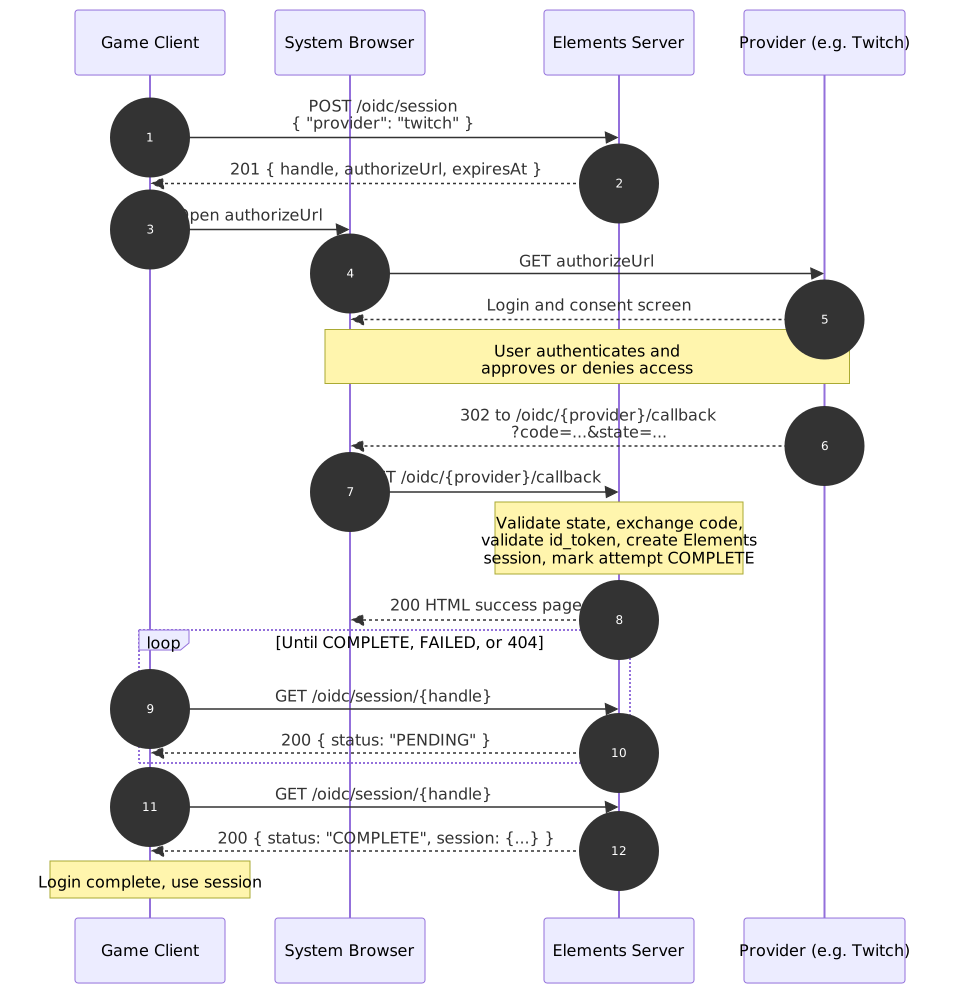
Full Request Sequence #
Endpoint reference #
Three endpoints appear in the flow above, but the client calls only two of them. POST /OIDC/Session starts the attempt and GET /OIDC/Session/{handle} polls it. The callback in between is provider-facing and is documented here so you can recognize it in logs, not because your client will ever invoke it.
1. POST /OIDC/Session, begin the attempt #
Requests, the client must begin the OIDC auth process. Each of the
{ "provider": "twitch" }{
"handle": "opaque-poll-handle",
"authorizeUrl": "https://id.twitch.tv/oauth2/authorize?...",
"expiresAt": 1234567890
}The client opens authorizeUrl in the system browser and retains handle for polling. expiresAt bounds how long the attempt stays valid; once it passes, the handle stops resolving and the client should start a fresh attempt.
2. Browser completes the provider’s login flow #
This step happens entirely between the User’s browser and the provider. The client Application is not involved and does not receive the redirect. The provider redirects the browser to the server’s registered callback:
GET /OIDC/{provider}/callback?code=...&state=...
This endpoint is provider-facing only, is never called by the game client, and always returns a 200 HTML page regardless of outcome. The actual result is observable only via the poll endpoint, which keeps the outcome on an authenticated channel the client controls.
3. GET /OIDC/Session/{handle}, poll for completion #
Response, one of:
status | Meaning |
|---|---|
PENDING | Still waiting on the User; poll again after a short delay. |
COMPLETE | Returned exactly once, on the poll that first observes completion. Includes Session, the completed Elements Session. |
FAILED | Login failed or was denied. Includes a human-readable reason. |
404 | The handle is unknown, already consumed, or has expired. |
Because COMPLETE is returned exactly once, the Session is delivered to a single caller and cannot be picked up by a replayed poll. Store the returned Session on receipt; a second poll against the same handle will 404.
Once COMPLETE is observed, the client has its Elements Session and the flow is done.
Shortcut: client already holds an id_token #
If the client already has a valid id_token from a native provider SDK, such as a platform Sign-In SDK, it can skip the browser and poll steps entirely:
{ "provider": "twitch", "idToken": "<id_token>" }POST /OIDC/Session with idToken set returns 200 synchronously with the completed Session, sharing the same token-validation logic as the callback path:
{ "session": { "...": "..." } }