

 Doc Summary

If you are trying to run Elements, or your custom Element project, directly in your IDE, and you see an exception like this:
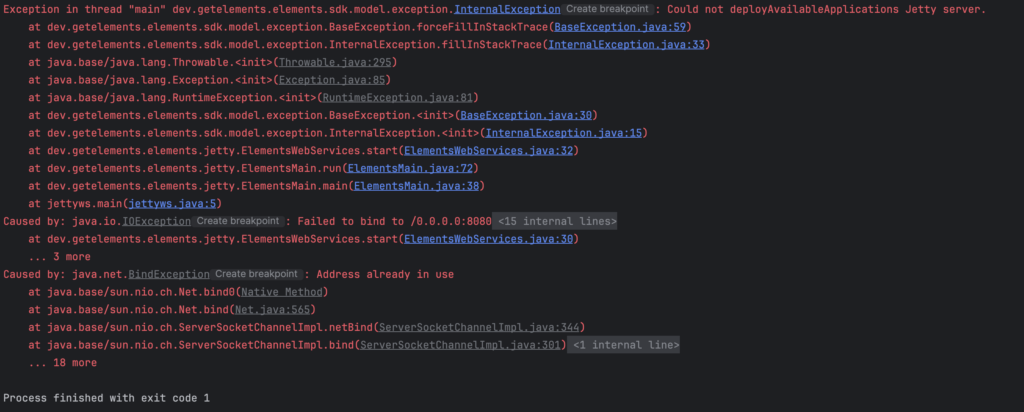
the important parts are:
Exception in thread "main" dev.getelements.elements.sdk.model.exception.InternalException: Could not deployAvailableApplications Jetty server.
...
Caused by: java.io.IOException: Failed to bind to /0.0.0.0:8080
...
Caused by: java.net.BindException: Address already in use
...
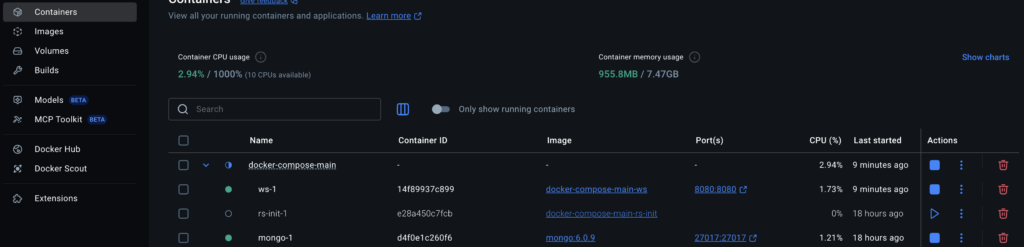
Then the likely culprit is that you are already running another instance of Elements locally. If you look at your running containers in Docker Desktop (or using Docker ps in the terminal), and you see that a ws container is running (ws-1 in this case), then it will already be using the address that the IDE will attempt to bind to. Shutting down this container will allow you to run in the IDE again. You can use the stop button in Docker Desktop, or via command line using docker stop <container name>, e.g. Docker stop Docker-compose-main-ws-1 (use Docker ps -a to see all containers and their names – use the name of the container to stop it).

Reminder!
Bear in mind that you’ll still want the mongo container running, even when running in the IDE.