Skip to content
  • Our Product
    • Namazu Elements
      • What is Elements?
      • Why open source?
      • Docs
        • Namazu Elements in Five Minutes or Less
        • RESTful APIs Library
        • Security Model
        • Accessing the Web UI (CMS)

    Our Product

    A logomark with three layered rhombuses adorning the lettermark that says Elements in bold all-caps sans-serif letters.
    • What is Namazu Elements? Discover our easy-to-use backend network solution built for online games. Rapidly enables full-scale multiplayer games or online solo adventures.
    • Why open source? Is there a truly open source server backend for connected games? There is now. Download and run a local copy of Namazu Elements and try it for yourself.
    Download Namazu Elements

    Get started

    • Quick start Read our Elements 5-minute quick start guide
    • Documentation Read our developer docs for learning more about Elements
    • RESTful APIs A full list of core API specs for working with the Elements framework
    • Security An overview of the server-authoritative security model of Elements
    • Accessing the CMS Manage your game with ease via the Namazu Elements CMS.

    Co-development Reimagined

    • Reduce your costs Would you rather outsource your backend development? Hire Namazu Studios to build your server backend with the power of Namazu Elements.
      Co-dev

    Recent Posts

    • The watercolor-styled Namazu Studios logo over a giant namazu lurking in the depth
      Namazu Studios Featured in San Diego Business Journal
      22 Sep 2025 Press
    • Namazu Elements 3.1 Released – Service Layer Fixes, Secure APIs, and Steam Bug Fix
      22 Apr 2025 Release Notes
  • Case Studies
  • About Us
  • News
  • Services
  • Book a call
namazu-studios-logo
Book a call

Getting Started

  • Namazu Elements in Five Minutes or Less
  • Accessing the Web UI (CMS)
  • CMS Feature Overview

Fundamentals

  • Why You Need a Server (and What “Authoritative” Means)
  • Elements as a Game Runtime
  • Where Your Authoritative Code Runs
  • Lifecycles and Flows

General Concepts

  • Overview
  • Custom Elements
  • Data Models
  • Security Model
  • N-Tier Architecture

Namazu Elements Core Features

  • User Authentication / Sign In
    • What is a User?
    • User Authentication in Elements
    • Auth Schemes
      • Auth Schemes
      • OAuth2
      • OIDC
  • Features
    • Applications
    • Sessions
    • Users and Profiles
    • Digital Goods
    • Progress and Missions
    • Progress and Missions (3.4+)
    • Leaderboards
    • Matchmaking – Comprehensive Guide
    • Followers
    • Friends
    • Receipts
    • Reward Issuances
    • Save Data
    • Metadata
    • Metadata (3.4+)
    • Queries
    • Web3
      • Wallets
      • Vaults
      • Omni Chain Support
      • Smart Contracts
        • Smart Contracts
  • Queries
    • Advanced Operators
    • Object Graph Navigation
    • Boolean Queries
    • Base Query Syntax
  • Advanced Operators
    • .name
    • .ref

Your Game Code - Adding Custom Elements

  • Custom Code Overview
  • Windows Setup
  • Mac OS Setup
  • Ubuntu Linux Setup
  • Element Anatomy: A Technical Deep Dive
  • Introduction to Guice and Jakarta in Elements
  • Structuring your Element
  • Events
  • Packaging an Element with Maven
  • Deploying an Element
  • Preparing for code generation
  • Properties
  • Websockets
  • RESTful APIs
  • Direct MongoDB Access (3.5+)

Configuration

  • Matchmaking – Comprehensive Guide
  • Direct Database Access and Batch Configuration
  • Batch Samples
    • Mission Upload Bash Script Sample
    • Item Upload Bash Script Sample

RESTful APIs

  • Importing into Postman
  • RESTful APIs Library
  • Swagger and Swagger UI

Add-Ons

  • Custom Elements
    • Crossplay
      • Namazu Crossfire (Multiplayer)
      • Deploying Namazu Crossfire in your game
  • Game Engines
    • Unity
      • Elements Codegen
      • Crossfire
    • Roblox
      • Roblox Overview
      • Secure Player Authentication & Registration
      • Global Matchmaking
      • Roblox Security Best Practices

Troubleshooting

  • Common Issues with Docker
  • Local SDK
    • Unable to deploy application : dev.getelements.elements.sdk.exception.SdkElementNotFoundException
    • Could not load class : java.lang.NoClassDefFoundError
  • Namazu Elements Community Edition
    • Common Issues with Docker
    • Unable to deploy application : dev.getelements.elements.sdk.exception.SdkElementNotFoundException
    • Running in the IDE
      • Exception in monitor thread while connecting to server localhost:27017
      • Could not deployAvailableApplications Jetty server Failed to bind to /0.0.0.0:8080 Address already in use

Releases

  • 3.6 Release Notes
  • 3.5 Release Notes
  • 3.4 Release Notes
  • 3.3 Release Notes
  • 3.2 Release Notes
  • 3.1 Release Notes
View Categories
  • Home
  • Docs
  • Namazu Elements Core Features
  • Features
  • Users and Profiles

Users and Profiles

Est. read time: 4 min read


Elements fully supports Users and Profiles that allow users of your application or game to store their profile data and access a network of applications from a single login profile. #

Elements uses a one-to-many model for the User / Profile relationship. A Profile is linked directly to both one single Application and one single User.

As Elements is a multi-tenant system, there can be many Applications that allow for many Profiles per Application.

This structure gives you the flexibility to create a network of Applications under the same roof, with any User level information, such as Inventory, accessible in every Application should you so choose.

User Properties #

A User has the following properties:

  • id
  • name
  • email
  • level
    • UNPRIVILEGED – An unprivileged/anonymous user.
    • USER – A basic user.
    • SUPERUSER – An administrator/super user, who can do all of the above as well as delete/create users.
  • linkedAccounts
    • A list of account types that the User is linked to, such as name, email, steam, google, apple, etc.

Managing Users in the Console #

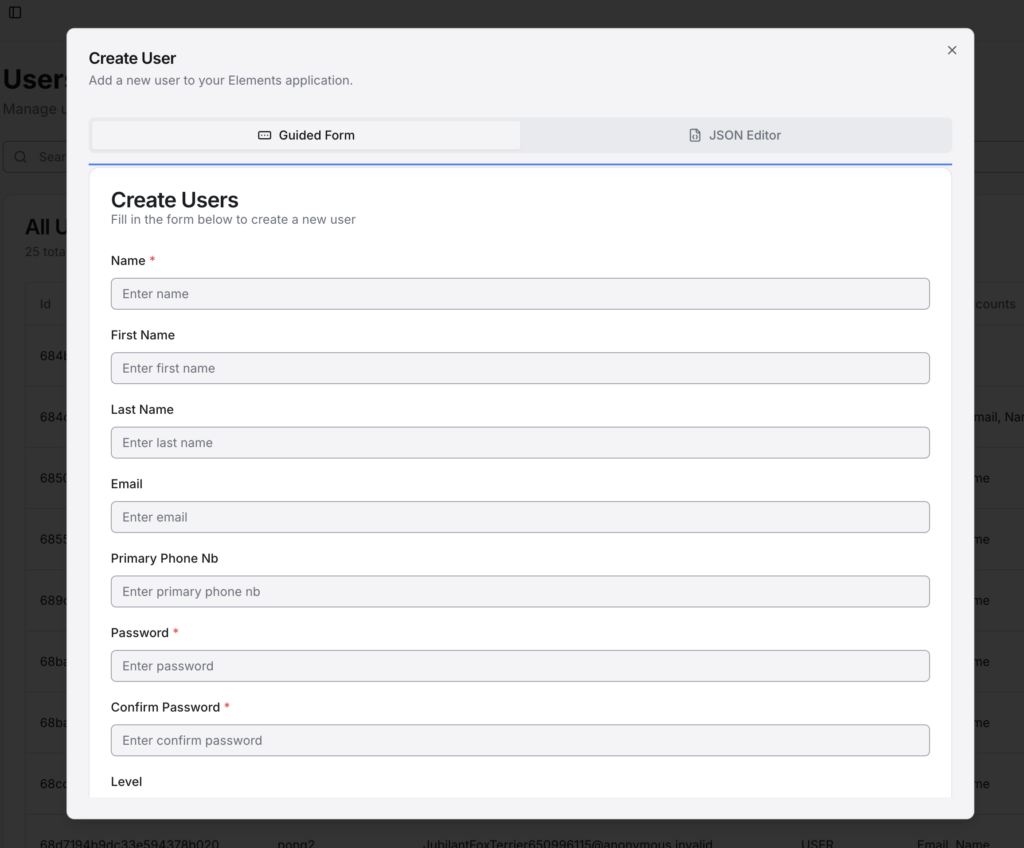
Users are managed in the Users section of the admin console, which can be accessed from the upper nav bar or in the hamburger menu.

The “Add User” button will open the new user panel.

Users can be edited by tapping the “Edit” button next to that user, or can be deleted by tapping the “Delete” button. Use the search function to more easily find specific users.

Passwords can be set or changed using the admin console as well. In the database, they are salted and hashed and can’t be manipulated directly.
JSON Structure of Users #

Here is a sample of a user JSON entry from the database:

{
    "_id" : ObjectId("5cdb0aa4e96c3c4f2bfe16ea"),
    "active" : true,
    "name" : "jsmith",
    "email" : "jsmith@elements.com",
    "level" : "SUPERUSER",
    "salt" : { "$binary" : "/thisissalt", "$type" : "00" },
    "passwordHash" : { "$binary" : "thisisapasswordhash=", "$type" : "00" },
    "hashAlgorithm" : "SHA-256"
}

Profile Properties #

A Profile has the following properties:

  • Id
  • User – The User that this Profile is linked to.
  • Application – The Application that this Profile is linked to.
  • ImageUrl – Any associated avatar image.
  • DisplayName – The name that should be displayed on the client side.
  • Metadata – Key/Value store that can be modified.
  • LastLogin – The time that the current session token was created (MS since epoch)

Once created, only the DisplayName and ImageUrl can be modified from the client side (via ProfilesApi). However, other properties, such as the Metadata, can be modified from the server side.

Profile Metadata #

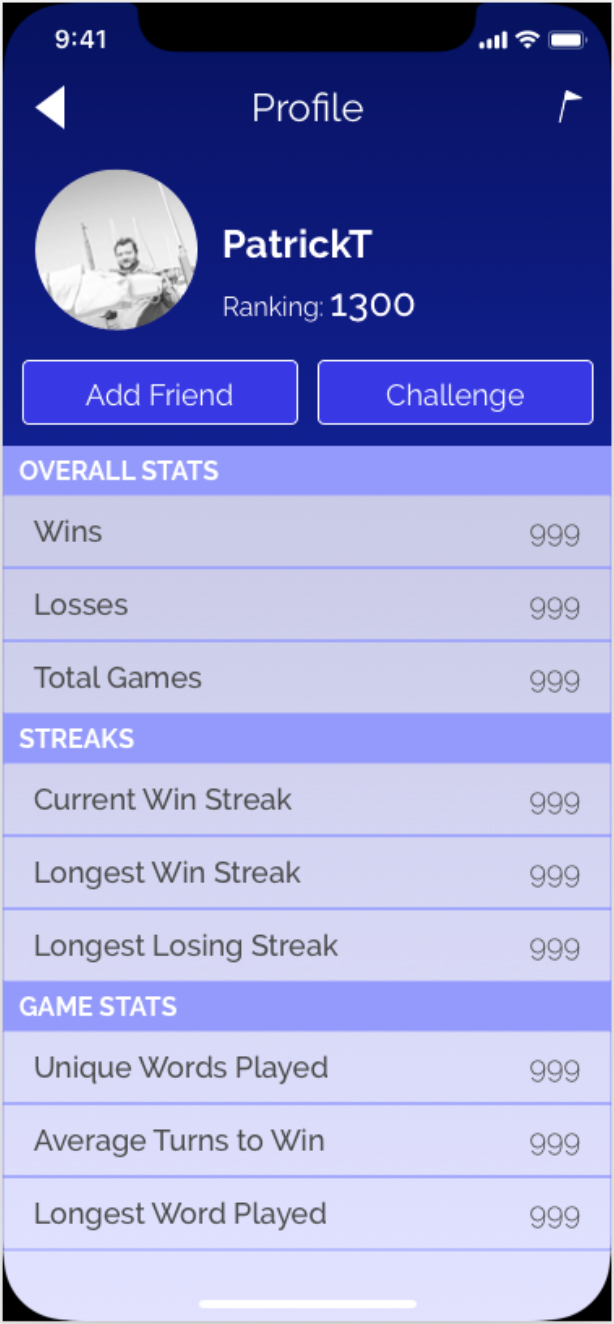
As mentioned in the previous section, the Profile metadata is a key/value store for just about anything that you’d want to be publicly facing (as Inventory is private) in a Profile. This is a great place for storing info that you might want different Profiles to know about each other. For example, say you have a game where someone can earn points to increase a numeric rank. In order to see that information, it needs to be stored in a publicly accessible place. Take this wireframe image for example:
FBPanelExample

All of the stats listed in this screen would be housed by the Profile metadata, so the JSON representation might look something like this:

{
    "id" : <id string>, 
    "user" : <redacted>,
    "application" : <Application JSON>,
    "image_url" : <path to image>,
    "display_name" : <display name string>,
    "last_login" : <last login time>,
    "metadata": {
        "ranking" : 1300,
        "wins" : 999,
        "losses" : 999,
        "total_games" : 999,
        "current_win_streak" : 999,
        etc...
    }
}

Managing Profiles Using the Console #

Note

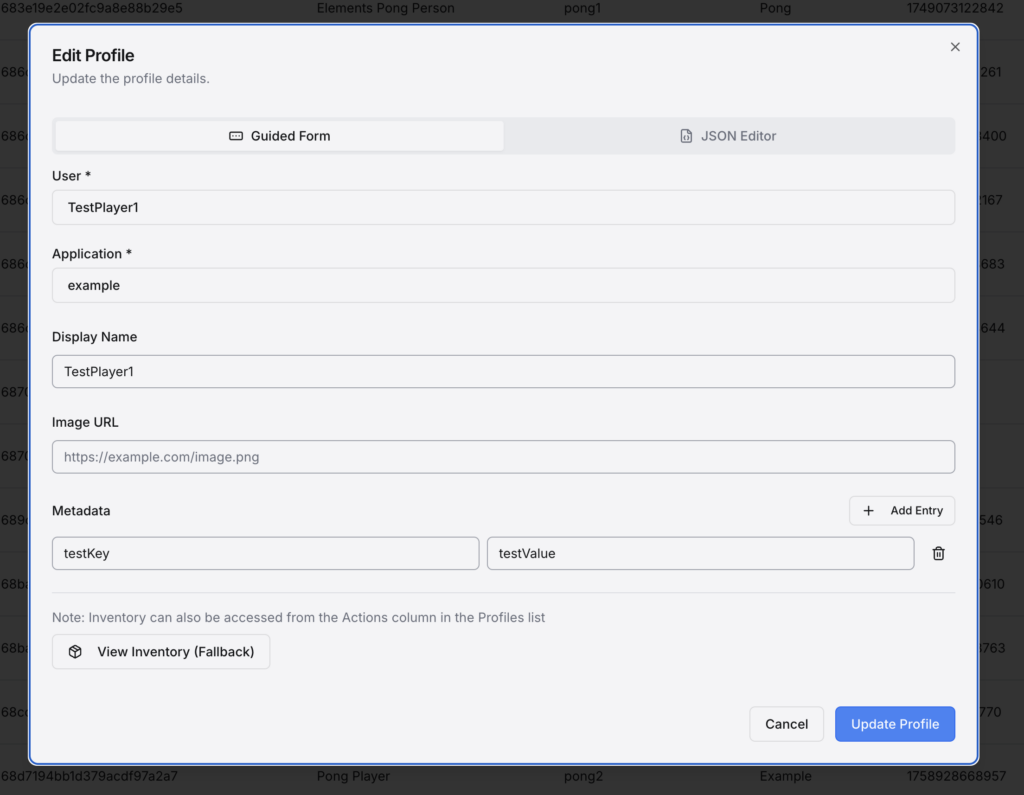
Profile metadata is edited identically to how item metadata is edited. See Editing Item Metadata.

Profiles can be added, edited, or deleted from the admin console in the Profiles section, accessible from the top nav bar or the hamburger menu.

Since Profiles must be connected to a user, when making a new profile you can use the “Select User” button to find the user that will own this profile. If you are editing an existing profile, you can use the “Edit User” button to open the Edit User panel for that user. Existing profiles cannot be reassigned to another user.

When creating a new profile, you must also select an Application. A dropdown menu will open with the available applications. If editing an existing profile, the Application may not be changed.
JSON Structure of Profile #

This is a sample profile represented in JSON:

[{
    "_id" : ObjectId("5cdb92e7e96c3c4f2b01106f"),
    "active" : true,
    "application" : {
        "$ref" : "application",
        "$id" : ObjectId("5cdb1088e96c3c4f2bfe1da7")
    },
    "user" : {
        "$ref" : "user",
        "$id" : ObjectId("5cdb92e5e96c3c4f2b0107ca")
    },
    "imageUrl" : "url/to/image",
    "displayName" : "DisplayName",
    "lastLogin" : ISODate("2019-05-15T04:17:47.127Z"),
    "metadata" : {
        "metadata_string" : "string"
        "metadata_int" : 1
    }
}]
What are your Feelings
Still stuck? How can we help?

How can we help?

Updated on January 31, 2026
SessionsDigital Goods
Table of Contents
  • Elements fully supports Users and Profiles that allow users of your application or game to store their profile data and access a network of applications from a single login profile.
  • User Properties
    • Managing Users in the Console
    • JSON Structure of Users
  • Profile Properties
    • Profile Metadata
    • Managing Profiles Using the Console
    • JSON Structure of Profile
  • Documentation
  • Terms of Service
  • Privacy Policy
  • Contact us
  • Linkedin
  • Join our Discord

Namazu Studios LLC is powered by Namazu Elements, an Elemental Computing Inc. product.

Elements
  • Download
  • About Elements
  • Open source
  • Documentation
  • Support
About Namazu
  • Case Studies
  • About Us
  • News
Get in Touch
  • info@namazustudios.com
  • Book a call
  • (619) 862-2890
  • Linkedin
  • Discord

©2008-2025 Namazu Studios. All Rights Reserved.