

 Doc Summary

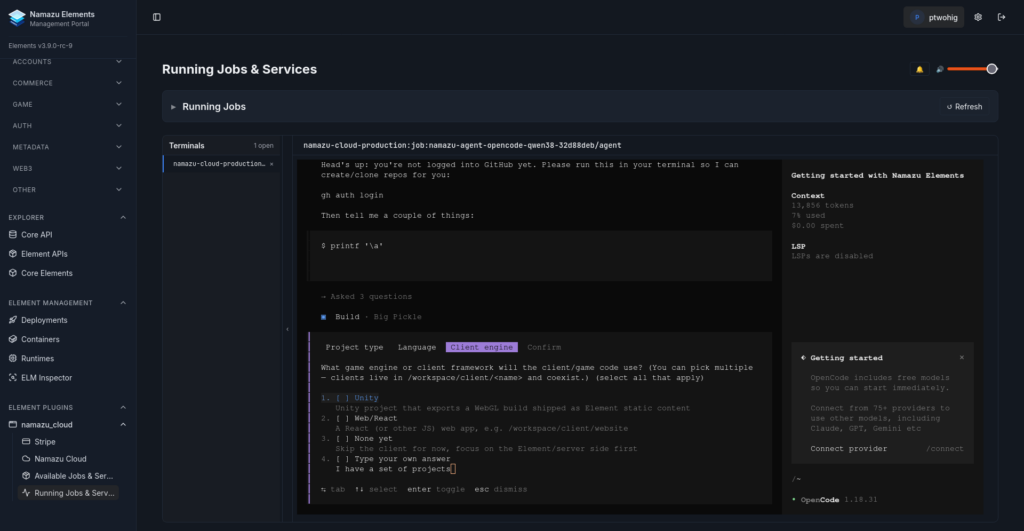
The Namazu Agent is an AI coding agent that runs inside Namazu Cloud as a managed, on-demand job. It is purpose-built to help build and extend Namazu Elements projects, whether that work is server-side code, dashboard UI plugins, static web content, or the front-end game/client code that talks to them. Start a Session from the Namazu Cloud control panel, and the agent gets to work against your project in its own workspace.
What the Agent Does for You #
The agent is a pair programmer, a deployment assistant, and an instance administrator in one. It can write code, commit and push changes, open pull requests, spin up disposable preview instances, and operate your running copy of Namazu Elements.
Code and Administer in One Place #
Because it runs within Namazu Cloud, the agent does more than edit files. With access to your running project it can administer your live instance, manage deployments, talk to the Elements REST API, and make changes to your game end to end without you touching a console.
Diagnose and Troubleshoot #
The same Session that writes your code can diagnose live issues. It reads real logs, queries the actual databases and services, and works against your instance’s own API to figure out what went wrong and fix it, rather than guessing from a stack trace alone.
Temporary Preview Instance #
On demand, the agent can spin up (and tear down) its own temporary Namazu Elements + MongoDB instance, a disposable copy of your main setup for previewing changes safely. Anything you break there is broken only in the sandbox, never in your real deployment. See Common Agent Tasks for the full workflow.
Bring Your Own Agent #
The Namazu Agent is not tied to a single vendor. It is built on top of three leading coding agents, selectable when you deploy, all working with the same custom configuration and MCP tools built into the execution environment:
- opencode (the default)
- OpenAI Codex (the
codexCLI) - Anthropic Claude Code (the
claudeCLI)
Whichever you choose, the agent keeps the same workflow: an onboarding-aware workspace, a project clone from GitHub, a temporary preview instance, and the ability to push, pull, and open pull requests on your behalf.
Model Options #
Two ways to power an agent Session, depending on the work and your budget:
- Bundled local/hosted models on GPU instances. A local model (for example Qwen 3.8B) runs on the GPU instance that hosts your Session, with no API key or outside account needed. It is typically the best value for budget-friendly work, troubleshooting, and instance administration.
- Your own API key or account. For deep and complex coding tasks, use the official opencode, Codex, or Claude Code tooling with your own API key. You can log in to your existing accounts through the agent, or supply an API key directly.
How Sessions Run #
Each agent Session runs as a job dispatched and managed by Namazu Conductor, the Elements orchestration engine. Conductor launches the Session, gives it its workspace, and tracks its state. It is also how the Session is visible from the Namazu Cloud control panel, where you can watch and stop it at any time (see the Namazu Conductor Admin API for the underlying job model).
Cost and Lifecycle #
Agent sessions are not always on. Each one is a per-job compute cost, not a standing Service, and an idle Session winds itself down automatically after a period of inactivity, so leaving a Session’s tab open does not leave the meter running. You can also stop a Session manually from the control panel whenever you are done with it.
Related Pages #
- Common Agent Tasks: the end-to-end workflow: launching a Session, GitHub auth, workspace setup, a temporary preview instance, and the development loop through to production
- Namazu Conductor: the orchestration engine that dispatches and manages agent sessions
- Namazu Conductor Admin API: the job model behind Session state and control-panel visibility
- Deploying an Element: what a finished, deployable Element looks like